
TEST REPORT
01 EXECUTIVE SUMMARY
Aramon carried out a gray-box security assessment of the NearTest web application over a five-day engagement. Testing focused on authentication, authorization and session handling across the customer-facing application and its administrative console. Two critical and two high-severity findings allow an authenticated standard user to reach administrative functionality, and are the priority for remediation.
02 SUMMARY OF VULNERABILITIES
The table below presents the vulnerabilities detected during the mission.
| ID | Severity | CVSS | Finding | Scope |
|---|---|---|---|---|
| C-01 | CRITICAL | 9.0 | Stored Cross-Site Scripting Leading to Administrative Session Compromise | POST /api/support/tickets/attachment |
| C-02 | CRITICAL | 9.9 | Broken Authorization Allowing Administrative Account Takeover | POST /api/admin/users/promote |
| H-01 | HIGH | 7.1 | Insecure Direct Object Reference Exposing Customer Records | GET /api/customers/{id}/invoices |
| H-02 | HIGH | 8.1 | Missing Server-Side Authorization on Administrative Actions | DELETE /api/admin/content/{id} |
| M-01 | MEDIUM | 5.3 | Username Enumeration in Password Recovery | POST /api/auth/forgot-password |
| M-02 | MEDIUM | 6.5 | Cross-Site Request Forgery on Sensitive Account Action | POST /api/account/email |
| M-03 | MEDIUM | 5.3 | Verbose Application Errors Exposing Internal Paths | Various endpoints |
| L-01 | LOW | 3.1 | Weak Password Policy Enforcement | POST /api/auth/register |
| I-01 | INFO | 0.0 | Web Server Version Disclosure | Global |
| I-02 | INFO | 0.0 | Missing Recommended Security Headers | Global |
| I-03 | INFO | 0.0 | Technology Stack Disclosure | Global |
| I-04 | INFO | 0.0 | Publicly Accessible Non-Sensitive Diagnostic Endpoint | GET /health |
03 SCOPE OF THE MISSION
Assess the security posture of the NearTest web application and its supporting API from the perspective of an authenticated standard user, with emphasis on access control between user roles.
| Asset / URL / IP | Description | Notes |
|---|---|---|
| https://app.neartest.io | Customer-facing web application | — |
| https://api.neartest.io | Application API | — |
| https://admin.neartest.io | Administrative console | — |
04 RULES OF ENGAGEMENT
| Start | 2026-08-10 |
| End | 2026-08-14 |
| Report delivery | 2026-08-20 |
05 PENTESTING METHODOLOGY
The assessment followed a standard web application testing methodology covering reconnaissance, authentication and session testing, authorization and access control testing, input validation, and configuration review, aligned with the OWASP Web Security Testing Guide.
06 EVALUATION CRITERIA & CVSS
The report uses CVSS v3.1. The Aramon display convention maps a 0.0 score to INFO for reporting, while official CVSS terminology calls this None.
07 VULNERABILITY DETAILS
The following section reproduces each finding with its CVSS vector, evidence, impact, and remediation guidance.
| Component / Asset | Support ticket attachments |
| Scope | POST /api/support/tickets/attachment |
| CVSS Vector | CVSS:3.1/AV:N/AC:L/PR:L/UI:R/S:C/C:H/I:H/A:H |
The support ticket attachment feature accepts HTML and SVG uploads without validating their content type. A standard user can attach a file containing JavaScript that executes in an administrator's browser when the ticket is opened, in the security context of the application.
Create a support ticket as a standard user and attach a crafted HTML file containing a JavaScript payload.
Wait for an administrator to open the ticket from the admin console.
The payload executes in the administrator's session and sends the session cookie to an external endpoint.
An attacker with a standard account can hijack an administrator's session and gain full administrative access, without needing the administrator's credentials.
Reject HTML and SVG uploads in the ticketing system, enforce a strict allow-list of file types, serve uploaded content from a separate cookieless origin, and apply a Content Security Policy to the admin console.
| Component / Asset | User role management |
| Scope | POST /api/admin/users/promote |
| CVSS Vector | CVSS:3.1/AV:N/AC:L/PR:L/UI:N/S:C/C:H/I:H/A:H |
The endpoint used to change a user's role does not verify that the requesting session belongs to an administrator. Any authenticated user can call it directly and set their own account to the administrator role.
Authenticate as a standard user and capture the request an administrator sends when changing a user's role.
Replay the request using the standard user's own session and user ID.
Reload the application. The account now has administrative privileges.
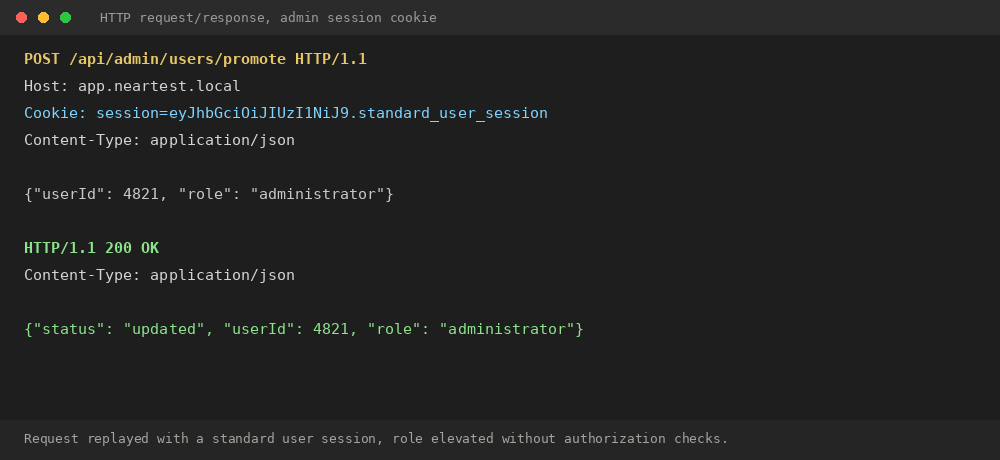
Complete compromise of the application's access control model. Any registered user can become an administrator without an exploit chain.
Enforce server-side role checks on every administrative endpoint, never rely on the client to hide administrative functionality, and log role changes for review.
| Component / Asset | Customer invoices |
| Scope | GET /api/customers/{id}/invoices |
| CVSS Vector | CVSS:3.1/AV:N/AC:L/PR:L/UI:N/S:U/C:H/I:L/A:N |
Customer invoices are retrieved using a sequential numeric identifier. The application does not verify that the requesting user owns the requested record, so any authenticated customer can view other customers' invoices by changing the identifier.
Authenticate as a standard customer account.
Request an invoice belonging to the account and note the identifier.
Increment the identifier and repeat the request.
Observe other customers' invoices, including names, addresses and billing details.
Any customer can enumerate and read other customers' billing information and personal details.
Verify object ownership on every request, use non-sequential identifiers where practical, and add authorization tests for resource-level endpoints.
| Component / Asset | Admin console |
| Scope | DELETE /api/admin/content/{id} |
| CVSS Vector | CVSS:3.1/AV:N/AC:L/PR:L/UI:N/S:U/C:H/I:H/A:N |
Several administrative actions, including deleting published content, are only restricted in the interface. The underlying API accepts requests from any authenticated session regardless of role.
Authenticate as a standard user, who does not see administrative controls in the interface.
Send the deletion request directly to the API using the standard user's session.
Confirm the content is deleted despite the account lacking administrative privileges.
A standard user can delete or modify content that should only be manageable by administrators, affecting data integrity for all users.
Apply the same authorization checks used in the interface to the underlying API, and add automated tests asserting non-admin accounts receive a 403 response.
| Component / Asset | Password recovery |
| Scope | POST /api/auth/forgot-password |
| CVSS Vector | CVSS:3.1/AV:N/AC:L/PR:N/UI:N/S:U/C:L/I:N/A:N |
The password recovery endpoint returns a different message depending on whether the submitted email address is registered, allowing an attacker to build a list of valid accounts.
Submit the recovery form with a registered email address and note the response.
Submit the form again with an unregistered email address and compare the response.
An attacker can enumerate valid accounts and use the list for targeted phishing or credential stuffing.
Return an identical response regardless of whether the account exists, and rate-limit the endpoint.
| Component / Asset | Account settings |
| Scope | POST /api/account/email |
| CVSS Vector | CVSS:3.1/AV:N/AC:L/PR:N/UI:R/S:U/C:N/I:H/A:N |
The endpoint used to change a user's registered email address does not include or validate an anti-CSRF token, and accepts requests based on the session cookie alone.
As an authenticated user, visit an attacker-controlled page that auto-submits a form to the email change endpoint.
The request executes using the victim's existing session and the registered email address changes without their knowledge.
An attacker can change a victim's registered email as a step toward taking over the account through password recovery.
Implement anti-CSRF tokens on state-changing requests and validate the Origin header as a secondary control.
| Component / Asset | Global error handling |
| Scope | Various endpoints |
| CVSS Vector | CVSS:3.1/AV:N/AC:L/PR:N/UI:N/S:U/C:L/I:N/A:N |
Unhandled exceptions return a full stack trace to the client, including internal file system paths and the framework version.
Submit malformed input to a form field that is not validated server-side.
Observe the resulting error page.
Internal paths, dependency versions and application structure are disclosed, aiding further attacks.
Return a generic error message to the client in production and log full details server-side only.
| Component / Asset | Account registration |
| Scope | POST /api/auth/register |
| CVSS Vector | CVSS:3.1/AV:N/AC:H/PR:N/UI:R/S:U/C:L/I:N/A:N |
The application accepts passwords as short as four characters with no complexity requirement, and does not check submitted passwords against known-breached password lists.
Register a new account using a short, common password such as "1234".
Confirm the account is created successfully.
Weak passwords increase the likelihood of successful credential stuffing and brute-force attacks.
Enforce a minimum password length and check new passwords against a breached-password list.
| Component / Asset | HTTP response headers |
| Scope | Global |
| CVSS Vector | CVSS:3.1/AV:N/AC:L/PR:N/UI:N/S:U/C:N/I:N/A:N |
The Server header returned by the application discloses the exact web server software and version in use.
Send a request to any application endpoint and inspect the response headers.
Version disclosure lets an attacker check for known vulnerabilities affecting that specific version.
Remove or genericize the Server header at the web server or reverse proxy level.
| Component / Asset | HTTP response headers |
| Scope | Global |
| CVSS Vector | CVSS:3.1/AV:N/AC:L/PR:N/UI:N/S:U/C:N/I:N/A:N |
Responses do not include recommended security headers such as Content-Security-Policy, X-Content-Type-Options or Strict-Transport-Security.
Send a request to the application and inspect the response headers.
The absence of these headers removes a layer of defense against content sniffing, clickjacking and downgrade attacks.
Add the recommended security headers at the application or reverse proxy level.
| Component / Asset | Response headers and client bundle |
| Scope | Global |
| CVSS Vector | CVSS:3.1/AV:N/AC:L/PR:N/UI:N/S:U/C:N/I:N/A:N |
Response headers and publicly served source maps reveal the frameworks, libraries and versions used to build the application.
Review response headers and publicly served JavaScript source maps.
Knowledge of the technology stack helps an attacker focus on known vulnerabilities affecting those components.
Remove identifying headers and avoid deploying source maps to production.
| Component / Asset | Health check |
| Scope | GET /health |
| CVSS Vector | CVSS:3.1/AV:N/AC:L/PR:N/UI:N/S:U/C:N/I:N/A:N |
A diagnostic endpoint is publicly reachable without authentication. It does not expose sensitive data but confirms internal service names and uptime.
Request the diagnostic endpoint without authentication.
Minimal on its own, but combined with other findings it helps an attacker understand the application's internal structure.
Restrict the endpoint to internal networks or authenticated monitoring systems.
08 RETEST / REMEDIATION STATUS
| ID | Finding | Original | Status | Retest Notes |
|---|---|---|---|---|
| C-01 | Stored Cross-Site Scripting Leading to Administrative Session Compromise | CRITICAL | Open | — |
| C-02 | Broken Authorization Allowing Administrative Account Takeover | CRITICAL | Open | — |
| H-01 | Insecure Direct Object Reference Exposing Customer Records | HIGH | Open | — |
| H-02 | Missing Server-Side Authorization on Administrative Actions | HIGH | Open | — |
| M-01 | Username Enumeration in Password Recovery | MEDIUM | Open | — |
| M-02 | Cross-Site Request Forgery on Sensitive Account Action | MEDIUM | Open | — |
| M-03 | Verbose Application Errors Exposing Internal Paths | MEDIUM | Open | — |
| L-01 | Weak Password Policy Enforcement | LOW | Open | — |
| I-01 | Web Server Version Disclosure | INFO | Open | — |
| I-02 | Missing Recommended Security Headers | INFO | Open | — |
| I-03 | Technology Stack Disclosure | INFO | Open | — |
| I-04 | Publicly Accessible Non-Sensitive Diagnostic Endpoint | INFO | Open | — |
09 APPENDICES
- Tooling and versions used
- Detailed asset inventory
- Test accounts / sanitized identifiers
- Evidence index
- Raw scan excerpts where appropriate
- Limitations and assumptions
- Additional engagement notes where appropriate